What I Built: Salesforce Flows-Based PoC
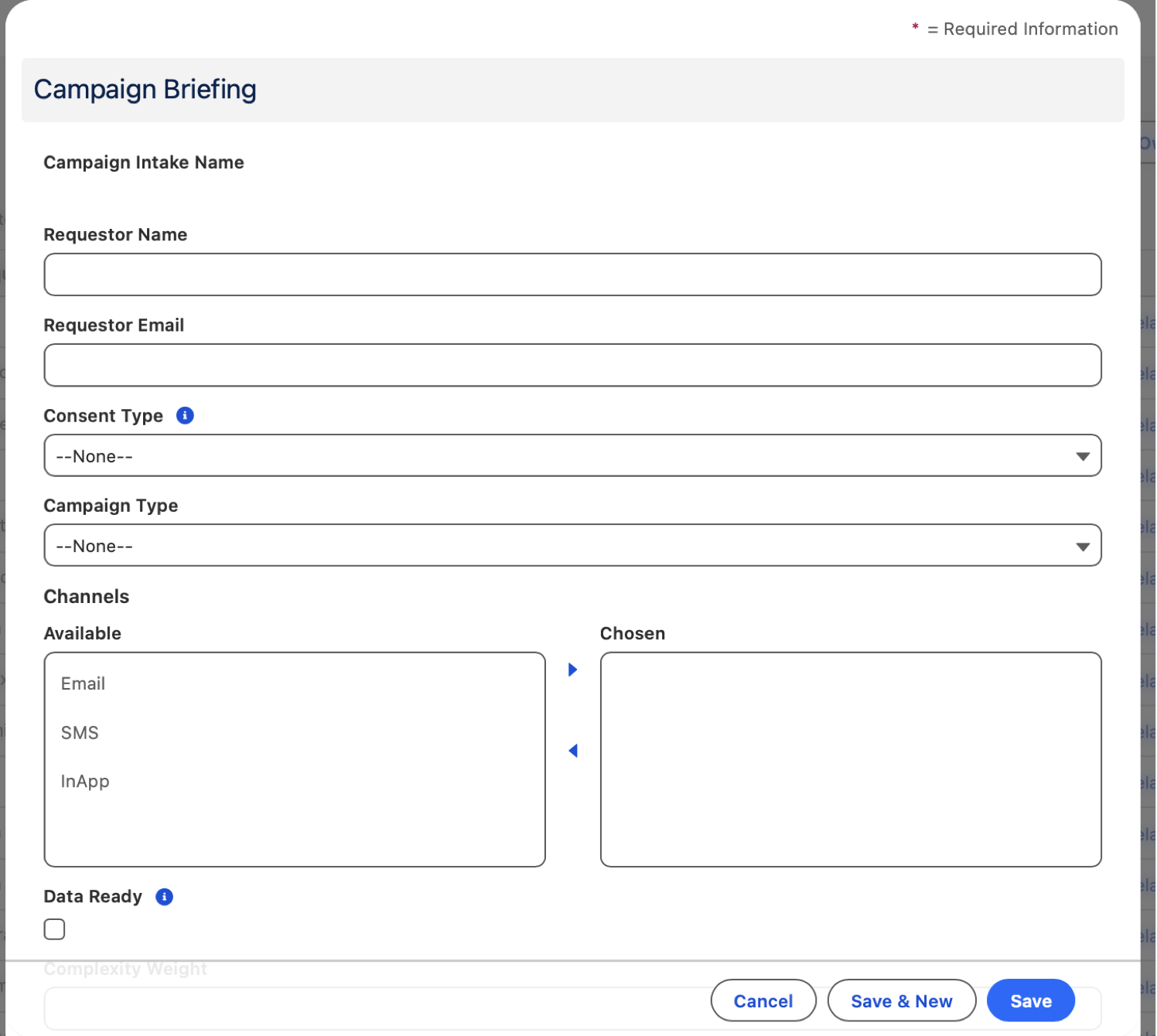
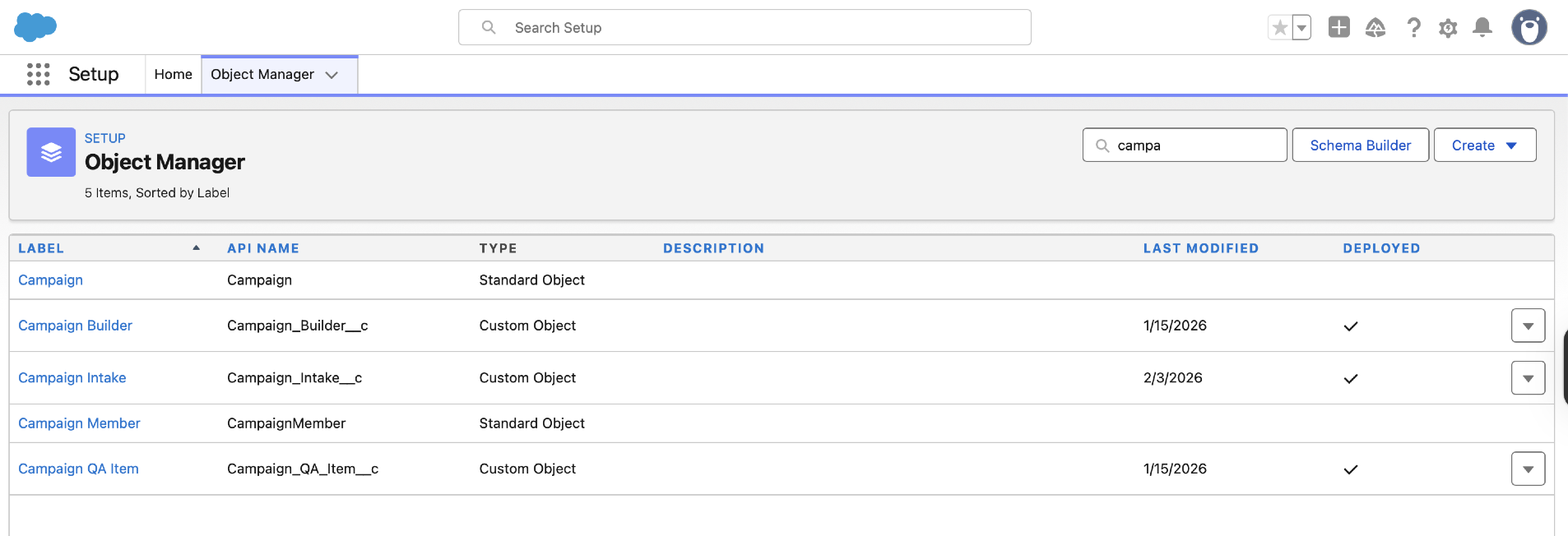
I built a working proof-of-concept in a Salesforce Developer Org using Salesforce Flows (not Agentforce). This is a fully functional campaign operations system that standardises intake, validates readiness, auto-assigns work, manages SLAs with pause/resume logic, and standardises QA. The PoC includes 3 custom objects, 3 record-triggered automation flows, validation rules, list views, dashboards, and a stage-tracking Path component. No Agentforce agents in Phase 1 — the system delivers value through clean data design and flow automation alone.
Key principle: I designed this to work without AI. Phase 1 is Flows-based automation. Agentforce agents (Phase 2) would enhance this foundation, not replace it. Everything built in Phase 1 is production-ready and valuable on its own.
Campaign Intake, Builder Directory & QA Items
Object 1: Campaign Intake (CI-00001 auto-number)
Business Unit Fields:
- Requestor Name, Requestor Email
- Campaign Type (picklist: New / Rerun / Rerun with Changes)
- Channels (multi-select: Email, SMS, In-App)
- Consent Type (picklist: Marketing / Operational)
- Data Ready (checkbox)
- Staggering Required (checkbox)
- Language Variant (picklist: English / Afrikaans)
- Rewards Message, Desired Send Window Start/End (datetime fields)
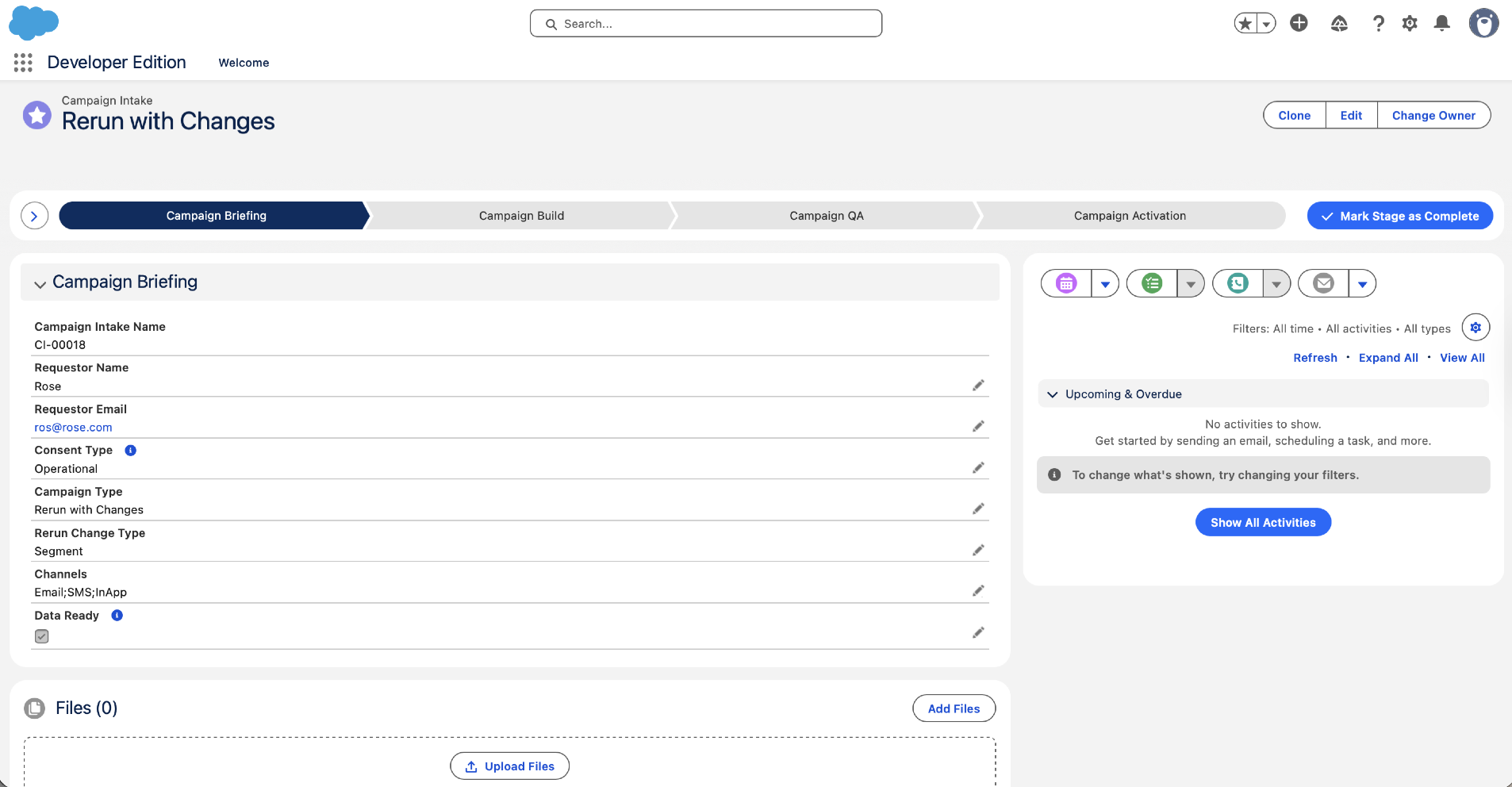
- Rerun Change Type (multi-select, conditional visibility — only shows for "Rerun with Changes"): Subject only, Content only, Segment only, Content + Segment, Journey Logic
System & Workflow Fields:
- Status (picklist — 8 values): Submitted → Not Ready – BU Action Required → Ready for Assignment → Assigned – In Build → In QA → Ready to Launch → Launched
- Stage (picklist): 1 – Briefing → 2 – Build → 3 – QA → 4 – Activated
- Complexity Level (derived: Low / Medium / High)
- SLA Days (number: Low=3, Medium=5, High=7, Rerun no-change=2)
- SLA Start DateTime, SLA Target DateTime, Build Stage Target DateTime (70% of SLA), QA Stage Target DateTime (90% of SLA)
- SLA Paused (checkbox), SLA Pause Start (datetime), SLA Paused Minutes (number)
- SLA Status (formula): On Track / At Risk / Breached
- SLA Met (checkbox), SLA Miss Reason (text)
- Actual Launch DateTime
- Briefing Ready (checkbox — system-calculated flag)
- Not Ready Reason (long text — required when status = "Not Ready")
Assignment Fields (Lookups to Campaign Builder):
- Assigned Content Builder (lookup)
- Assigned Journey Builder (lookup)
- Assigned To (derived formula showing display name of Content/Journey builder)
- QA Reviewer (lookup to Campaign Builder)
Object 2: Campaign Builder (Directory of Builders)
- Builder Type (picklist: Content Builder / Journey Builder)
- Active (checkbox)
- On Leave (checkbox)
- User (lookup to User object)
Object 3: Campaign QA Item (Master-Detail to Campaign Intake)
- QA Stage (picklist: Intake QA / Build QA / Pre-Launch QA)
- Check Name (text — e.g., "Consent verified", "Segment logic validated", "Links tested")
- Result (picklist: Pass / Fail / N/A)
- Comments (long text)
- Completed By, Completed DateTime
The Automation Engine
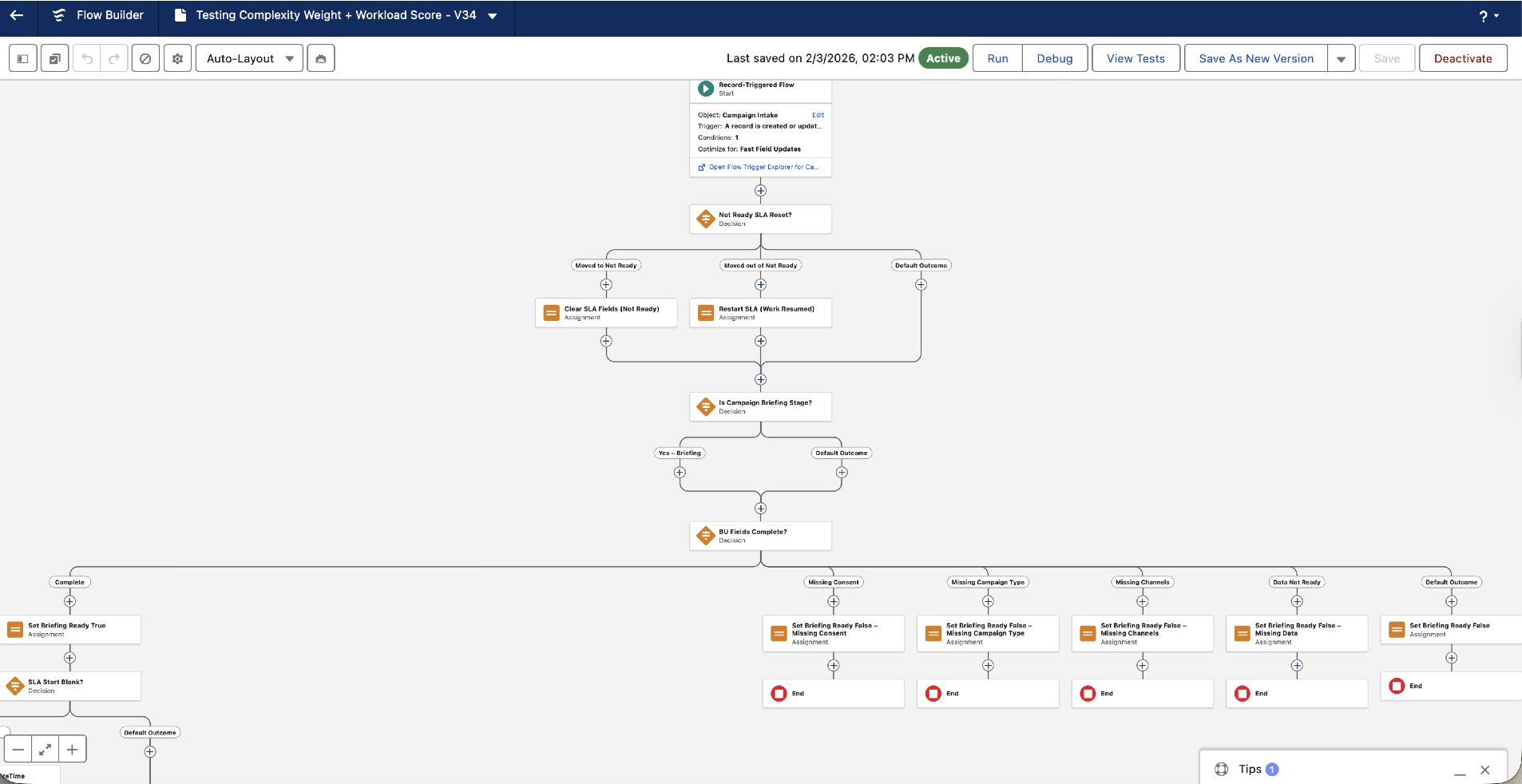
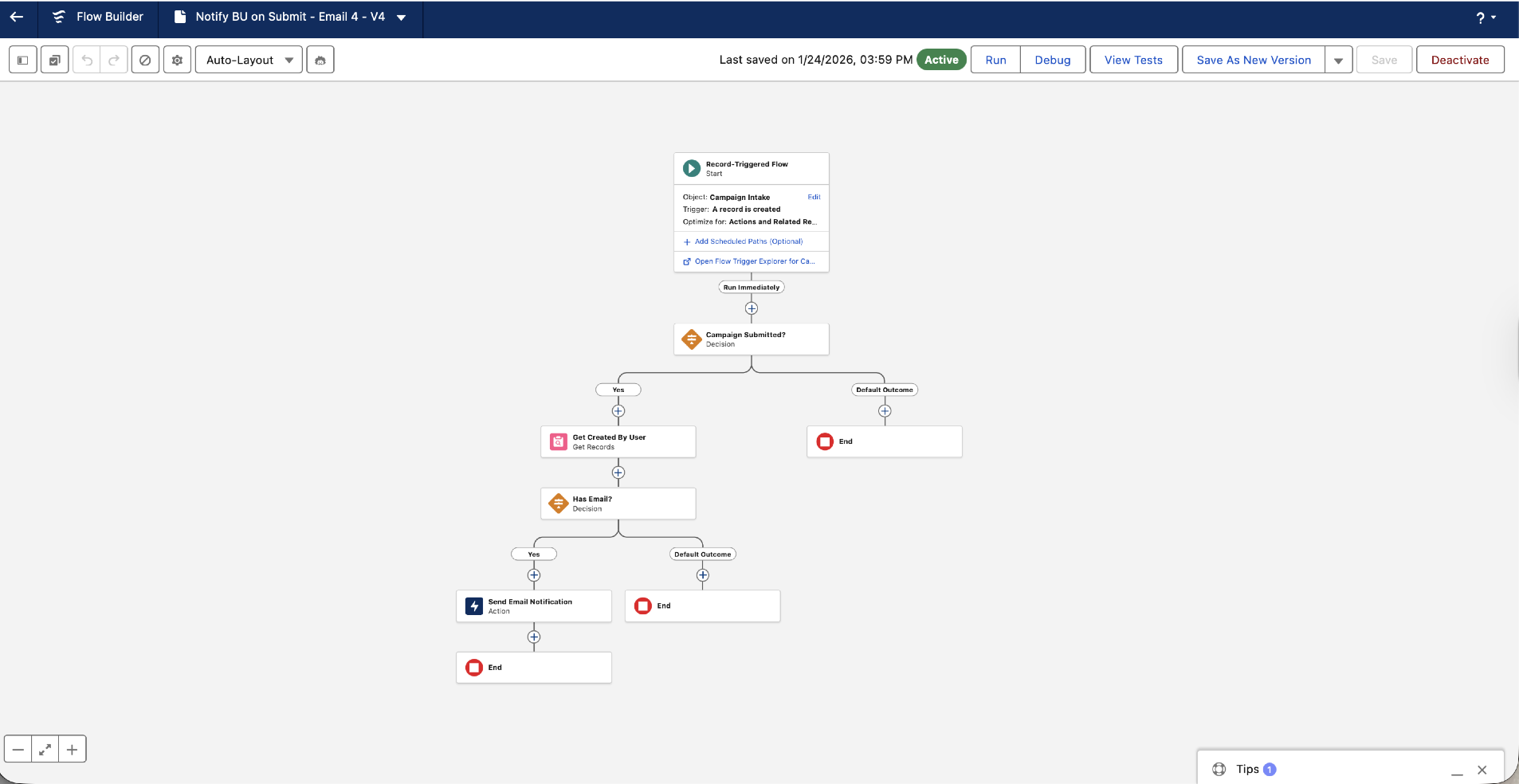
Overview: Three core record-triggered flows handle the entire campaign lifecycle automation — triggered when Campaign Intake records are created or updated. These three flows replace what would traditionally be 8+ separate flows, consolidating validation, routing, and SLA management into cohesive, reusable components.
Flow 1: Briefing – Calculate Readiness and SLA (Record-Triggered, Before Save)
Trigger: Before save on Campaign Intake record
Responsibilities:
- BU Field Validation: Checks Campaign Type, Channels, Consent Type, Data Ready are populated; if not, marks Briefing_Ready = false and sets Status = "Not Ready – BU Action Required"
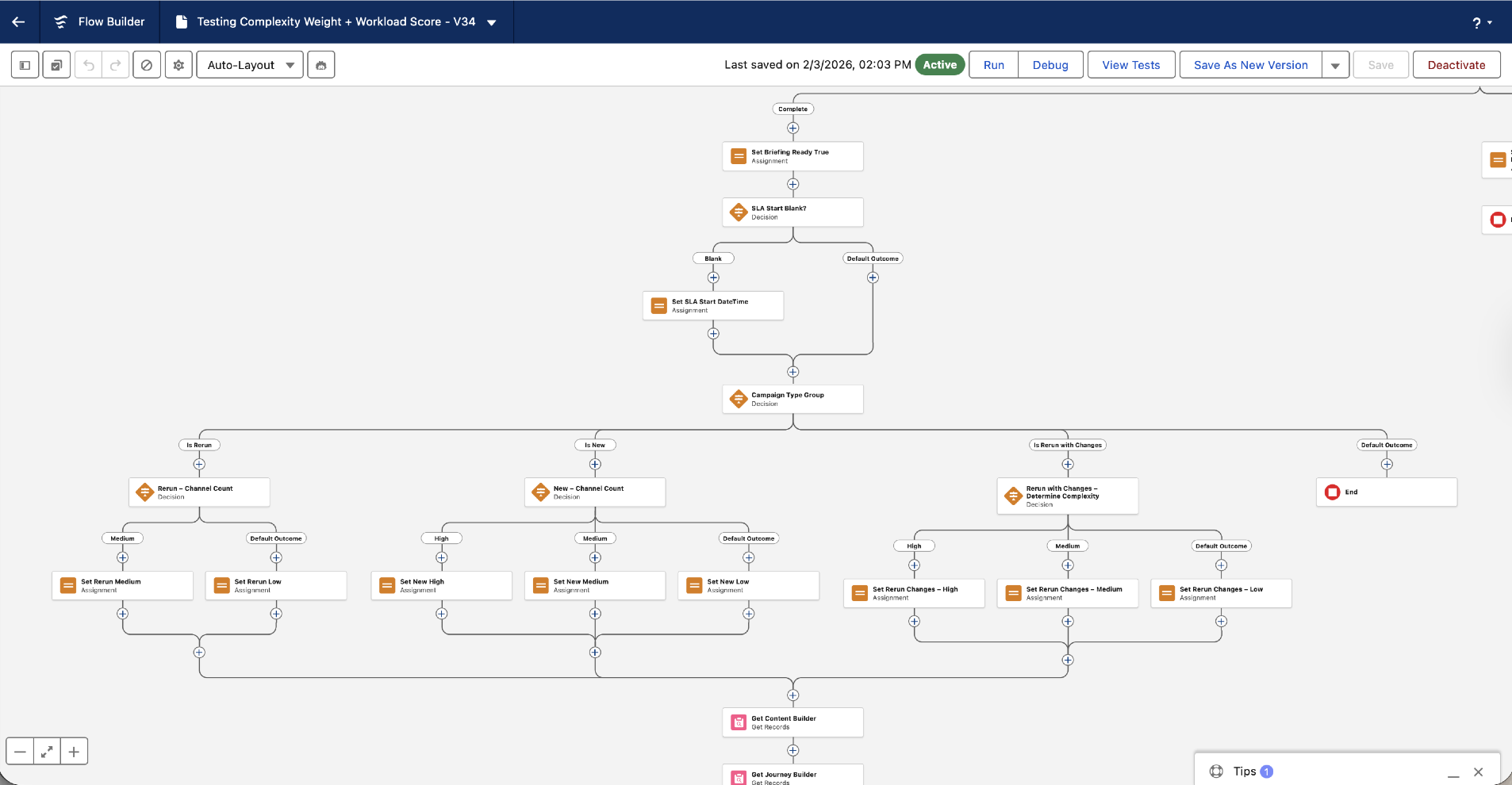
- Complexity Level Calculation: Scores campaign by type and channels (New 3-channel = High, New 2-channel = Medium, etc.; Reruns = always Low; Rerun with Changes scored by change impact)
- SLA Days Assignment: Sets SLA Days based on Complexity (Low=3, Medium=5, High=7, Rerun no-change=2)
- SLA DateTime Derivation: Calculates SLA Start DateTime (NOW if entering Ready state), SLA Target DateTime (Start + Days), Build Stage Target DateTime (Start + 70% of Days), QA Stage Target DateTime (Start + 90% of Days)
- Briefing_Ready Flag: Sets to true when validation passes; this flag gates Flow 3 triggering
Output: Campaign Intake record has Complexity Level, SLA Days, all SLA DateTimes, and Briefing_Ready flag set. Status remains "Not Ready" if fields incomplete, or is ready to transition to "Ready for Assignment".
Flow 2: SLA Pause/Resume (Record-Triggered)
Trigger: After save when Status field changes
Responsibilities:
- Pause Logic: If Status ENTERS "Not Ready – BU Action Required", sets SLA Paused = true, SLA Pause Start = NOW()
- Resume Logic: If Status LEAVES "Not Ready", calculates minutes elapsed (NOW() - SLA Pause Start), adds to SLA Paused Minutes field, extends SLA Target DateTime by paused duration, clears SLA Paused checkbox
- Pause Duration Tracking: Maintains audit trail of how long campaigns were blocked waiting for BU actions
- Fair SLA Management: Prevents builders being penalised for delays caused by BU (data not ready, approvals, missing assets); SLA clock only measures actual work time
Output: SLA timeline is extended when work is blocked by BU; pause durations are tracked for reporting and process improvement.
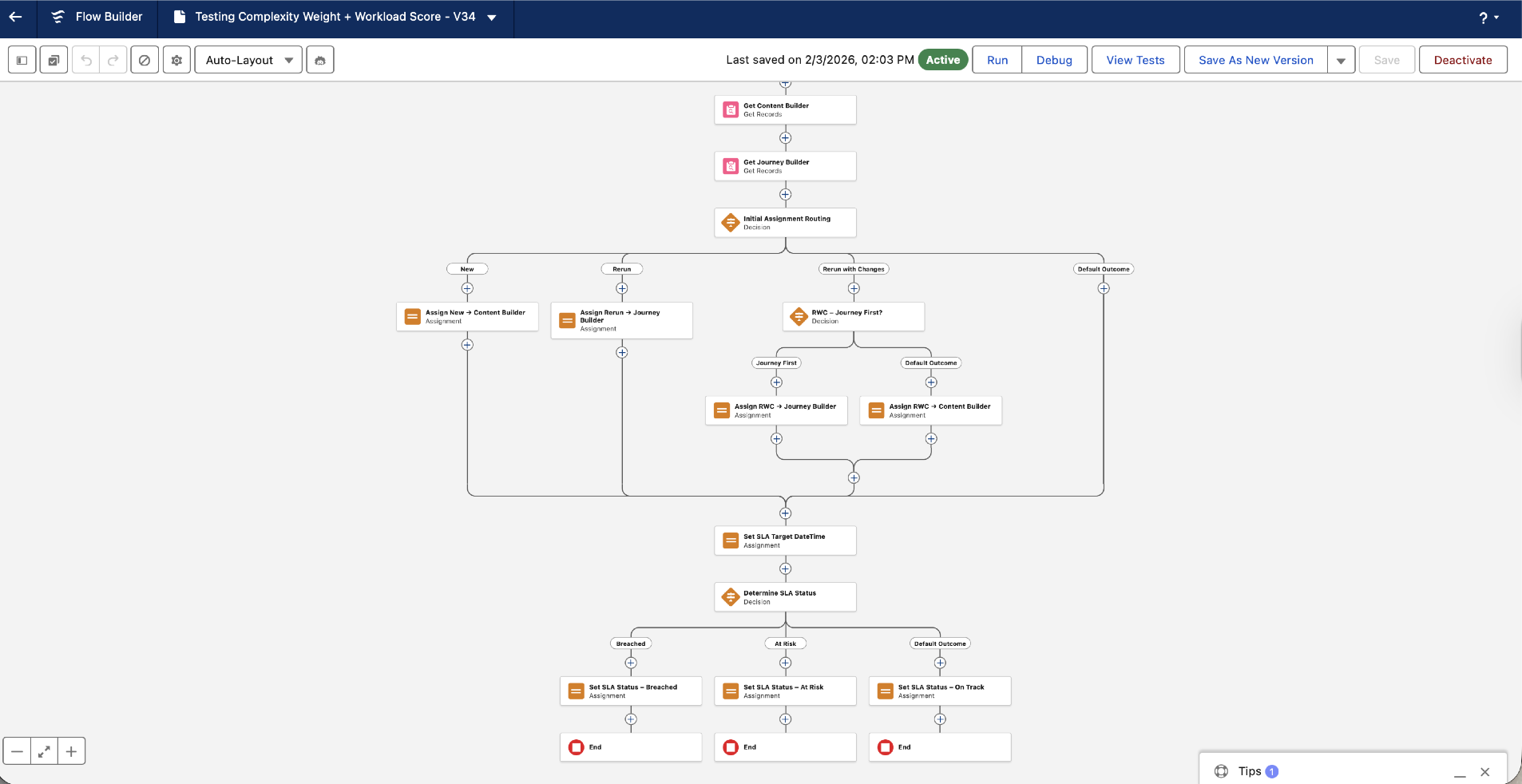
Flow 3: Initial Assignment Routing (Record-Triggered)
Trigger: After save when Briefing_Ready = true (set by Flow 1)
Responsibilities:
- Eligible Builder Query: Fetches all Campaign Builder records where Active = true and On Leave = false
- Workload Calculation: For each builder, counts assigned campaigns and weights by Complexity Level (Low=1, Medium=2, High=3) to determine effective workload
- Lowest Workload Assignment: Selects builder(s) with lowest weighted workload for each role (Content vs Journey)
- Assignment Rules: New campaigns → both Content Builder AND Journey Builder; Reruns → Journey Builder only; Rerun with Changes → Journey Builder always, plus Content Builder if content changes selected
- Notification & Tracking: Creates Tasks for assigned builders (due = Build Stage Target DateTime), sends Custom Notification to each, sends confirmation email to requestor with assigned builder(s) and target date
- Status Advancement: Sets Status = "Assigned – In Build", triggering downstream work
Output: Campaign is assigned to appropriate builders based on fair workload distribution. Builders receive Tasks and notifications. Requestor is informed of assignment and target completion date.
Why Three Flows? Each flow has a distinct trigger and responsibility: Flow 1 validates briefing inputs and calculates SLA terms upfront (before save prevents invalid data); Flow 2 manages pause/resume to ensure fair SLA tracking; Flow 3 routes work to builders only after briefing is validated. This separation of concerns makes each flow testable, maintainable, and resilient to mid-stream changes.
Support: Validation Rules & Screen Flows
These three core flows are supported by validation rules (Section 5.4) that prevent invalid state transitions and a BU Intake Screen Flow (for guided data entry) plus QA Completion Screen Flow (for QA reviewer sign-off). See Section 5.4 for governance rules and Section 5.6 for QA workflow.
Data Quality & Stage Guards
| Validation Rule | Condition (blocks save if true) | Why |
|---|---|---|
| BU_Required_Fields_When_Briefing | Stage = "1 – Briefing" AND (Campaign Type is blank OR Channels is blank OR Consent Type is blank) | Prevent incomplete briefings; Flow 1 checks these fields before advancing campaign |
| Require_Not_Ready_Reason | Status changes to "Not Ready – BU Action Required" AND Not Ready Reason field is blank | Force justification when marking campaign Not Ready; prevents unexplained rejections |
| Require_Rerun_Change_Type | Campaign Type = "Rerun with Changes" AND Rerun Change Type multi-select is blank | Require specificity on what changed (subject/content/segment/journey) so Complexity Scoring is accurate |
| Block_QA_to_Ready_if_Fails | Status changes to "Ready to Launch" AND any Campaign QA Item has Result = "Fail" | Prevent campaigns with QA failures from advancing to activation |
| Require_SLA_Miss_Reason | Status = "Launched" AND SLA Met = False AND SLA Miss Reason is blank | Capture reasons for SLA breaches (debugging, process improvement) |
Real-Time Visibility for Ops, Builders & BU
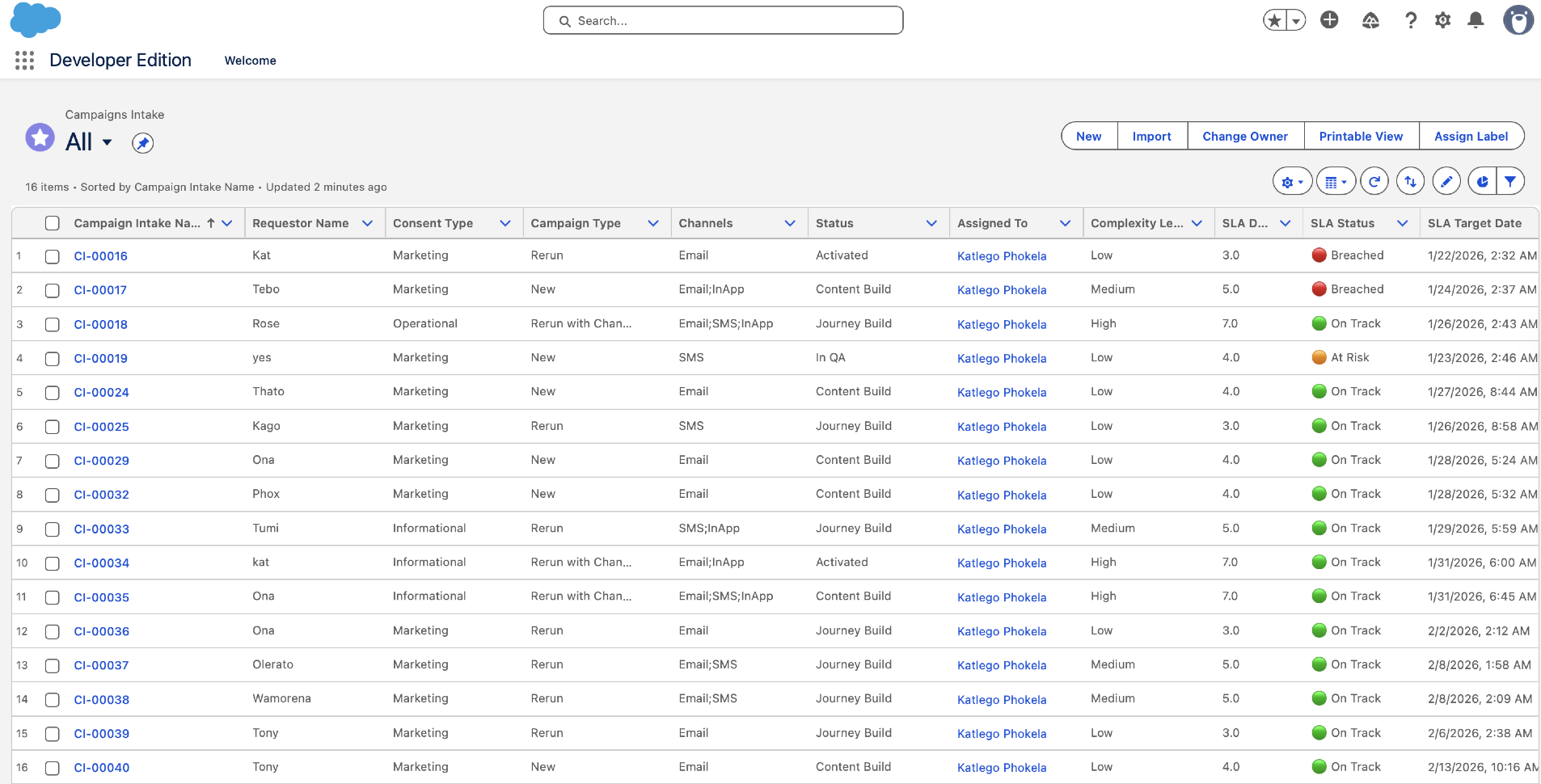
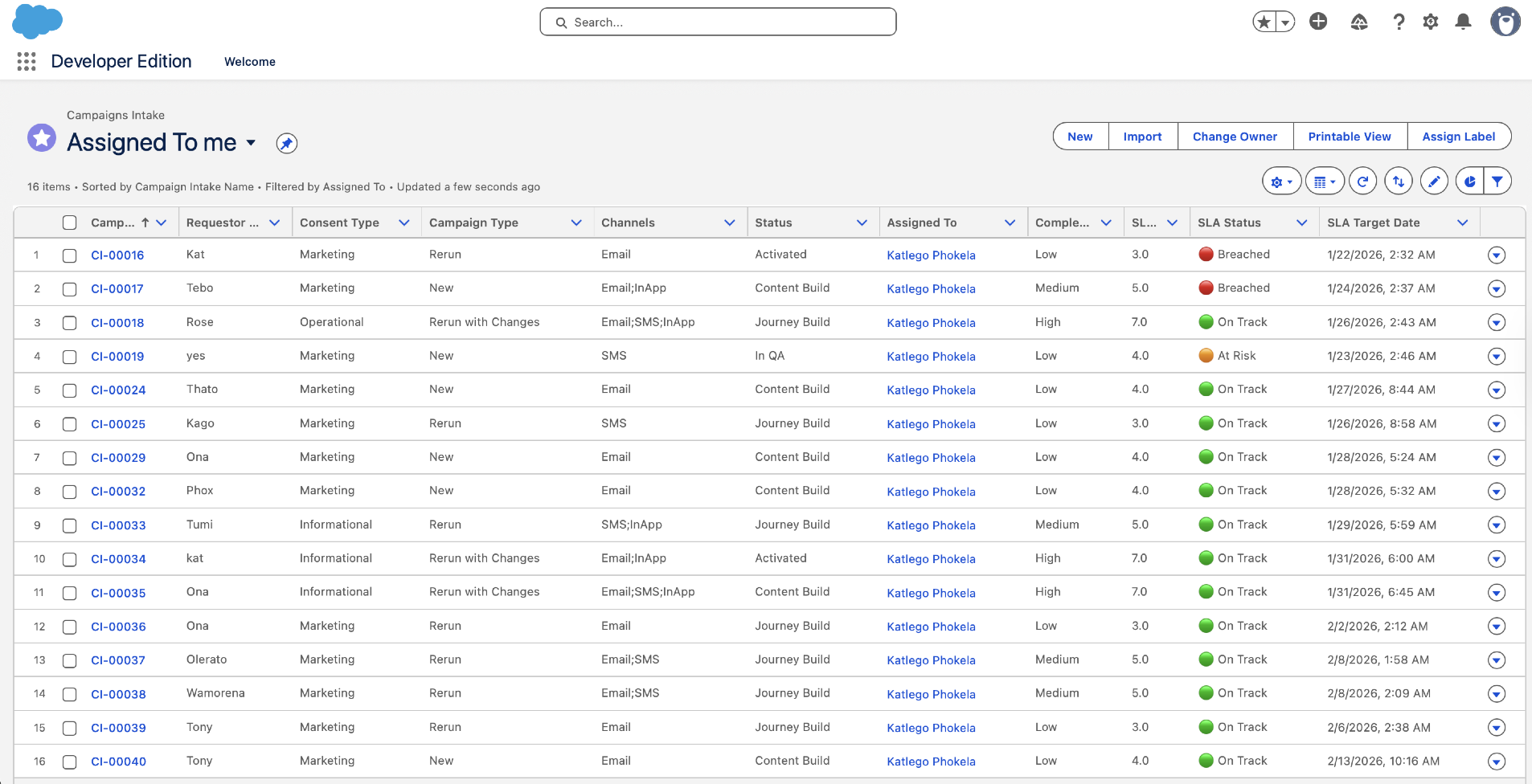
List Views (Campaign Intake)
- All Campaigns: Everything; default sort = Created Date (newest first)
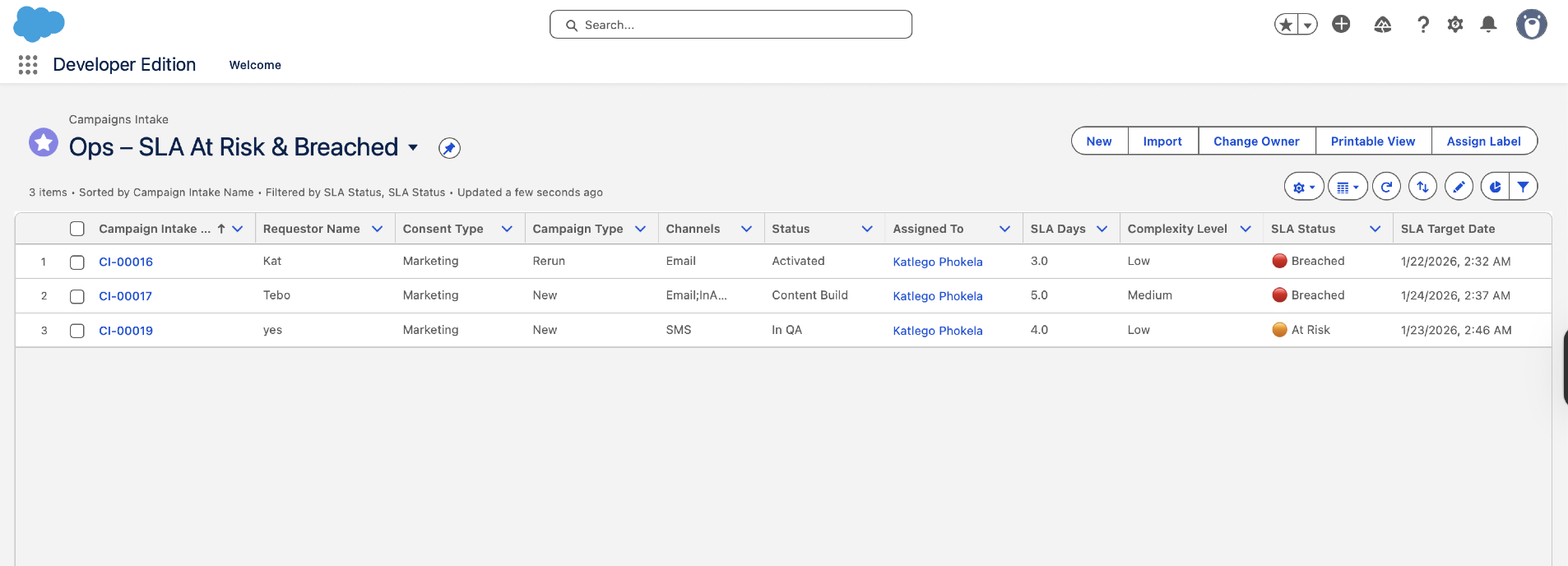
- Ops – SLA At Risk & Breached: Filtered on SLA Status = "At Risk" OR "Breached"; shows campaign name, complexity, SLA target date, current status
- My Content Builds: Filtered to Assigned Content Builder = current user AND Status contains "Build"; shows what Content Builders are working on
- My Journey Builds: Filtered to Assigned Journey Builder = current user AND Status contains "Build"; shows what Journey Builders are working on
- Awaiting BU Action: Status = "Not Ready – BU Action Required"; shows blocked campaigns and Not Ready Reason
- Ready for QA: Status = "In QA"; shows which campaigns are in QA queue
Kanban View (by Status)
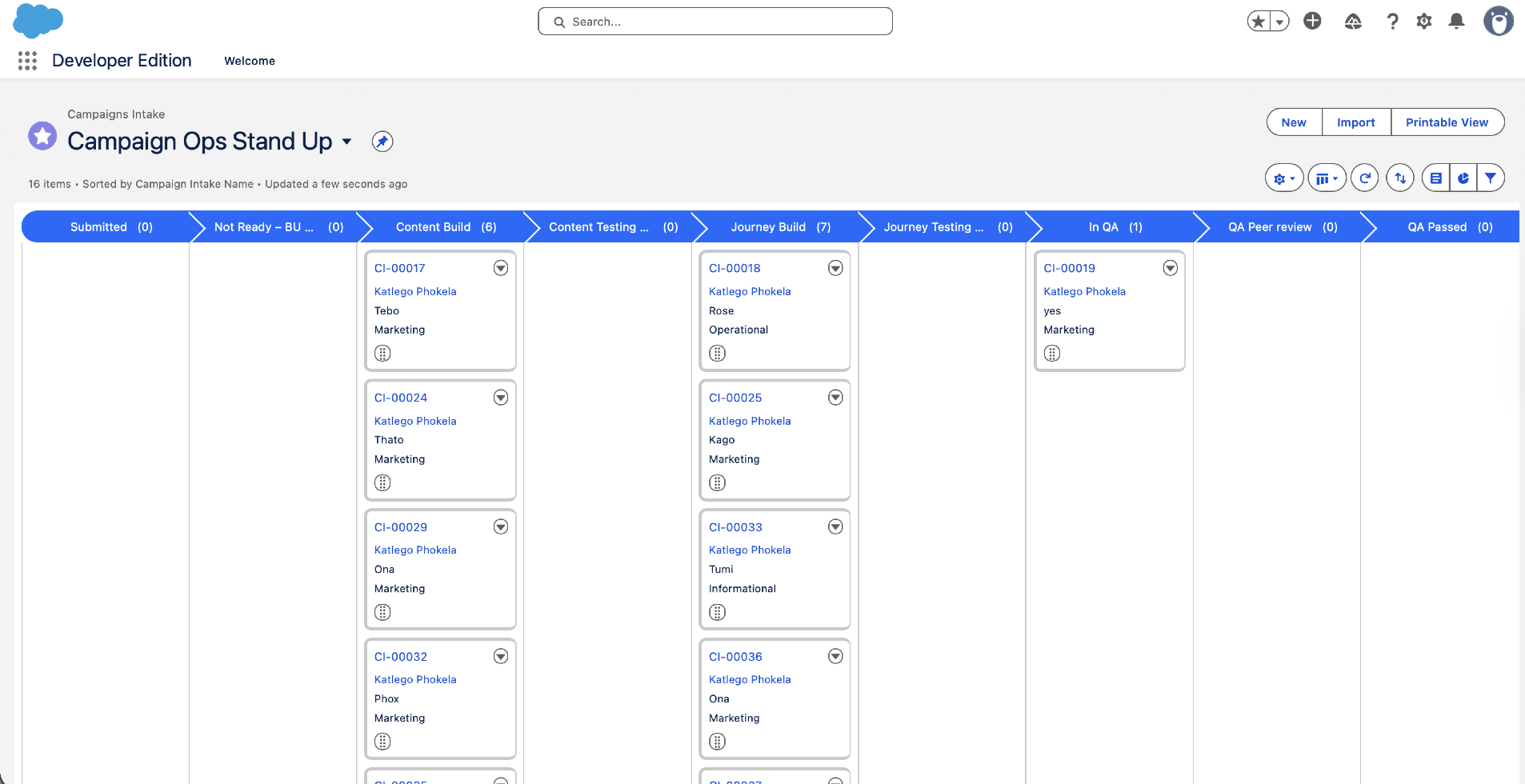
Campaign Intake has a Kanban board grouped by Status field, showing columns for each stage (Submitted → Not Ready → Ready for Assignment → Assigned – In Build → In QA → Ready to Launch → Launched). Allows Ops lead and team to see workflow state visually at daily standup.
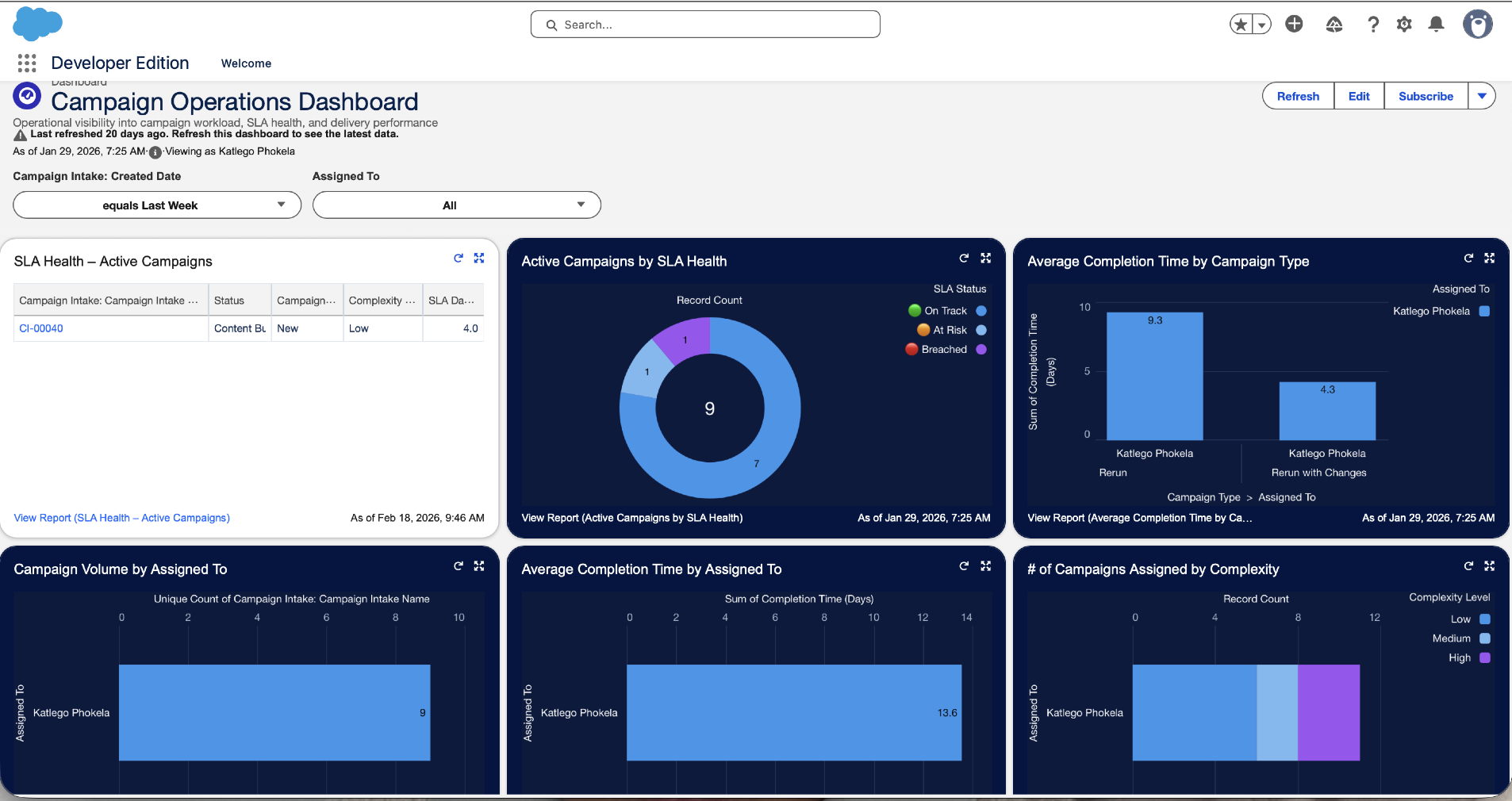
Dashboards (3 audience-specific)
Dashboard 1: Ops Lead View
- Campaign Pipeline (pie chart: % by status)
- SLA Health (metric tiles: On Track / At Risk / Breached)
- Workload by Builder (bar chart: campaigns per builder, colour-coded by complexity)
- Average Campaign Cycle Time by Complexity (table: Low/Medium/High with days)
- At-Risk Campaigns (table: name, SLA Target, days remaining, assigned builder)
Dashboard 2: Builder Queue View
- My Assigned Campaigns (filtered by current user, status = In Build, sorted by Build Stage Target DateTime)
- Overdue Builds (campaigns where Build Stage Target DateTime has passed)
- QA Ready (campaigns in "Ready for QA" status, showing QA Target Date)
Dashboard 3: BU Requestor View
- My Campaigns (filtered by requestor email, all statuses)
- Campaign Status Cards (name, current stage, estimated completion date, assigned builders)
- Not Ready Reasons (if campaign in Not Ready status, shows reason and action required)
Path Component (Record Page)
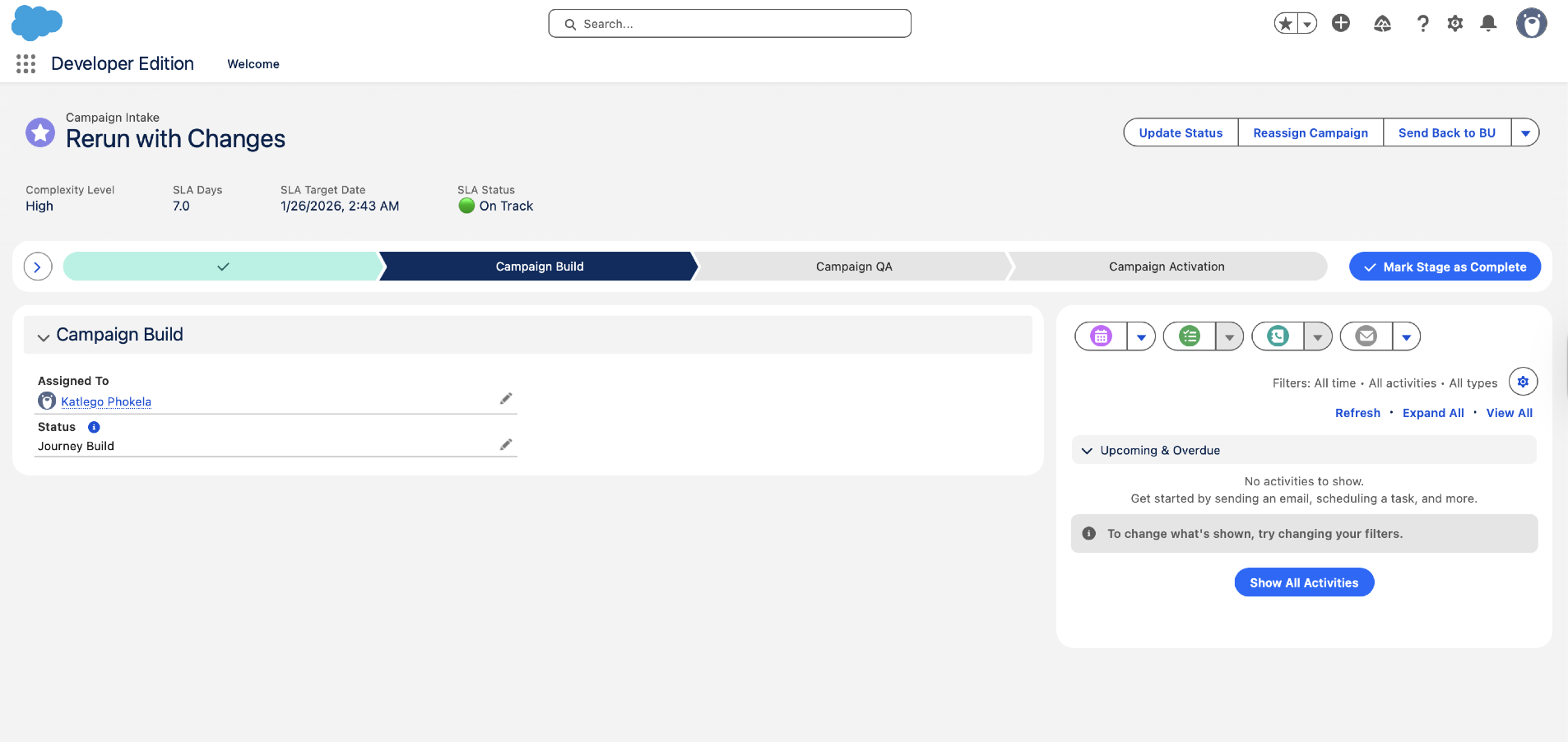
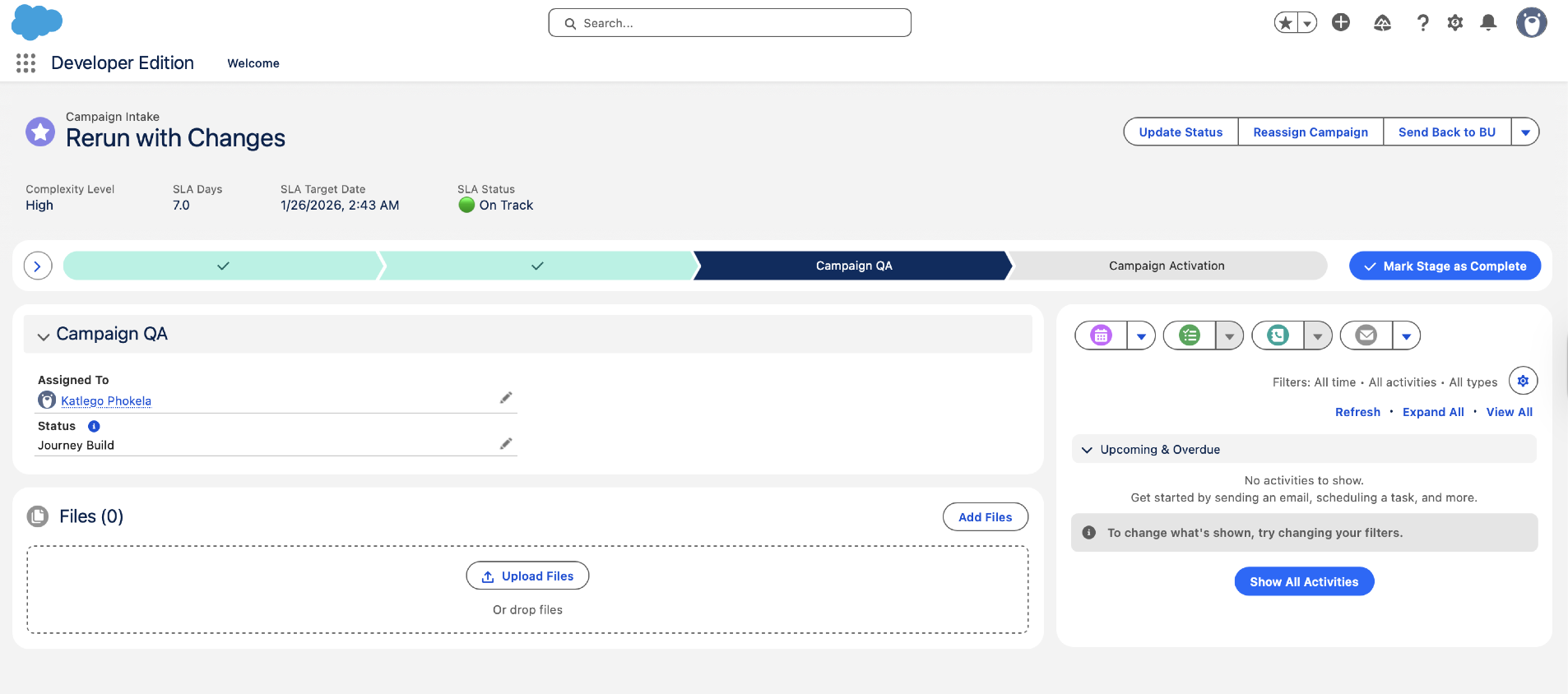
Campaign Intake record page displays a visual Path component showing the 4-stage journey: 1 – Briefing → 2 – Build → 3 – QA → 4 – Activated. Highlights current stage; BU and builders see progress visually.
Eliminating Manual Buddy Checks
Problem solved: Previous process relied on Excel checklist + email + buddy system. QA tracking was invisible, manual, and error-prone.
New process: When campaign enters "In QA" status, a validation rule coupled with an asynchronous process auto-creates 10–15 Campaign QA Item records with standardised checks. QA Reviewer uses the QA Completion screen flow to mark each item Pass/Fail/N/A and add comments. All evidence captured in Salesforce (no separate Excel). Audit trail shows who approved what and when. Failures block advancement to "Ready to Launch".
QA Checks Included
Data & Audience
Segment logic validated, DE count reconciled, suppressions applied, audience freshness verified.
Journey Logic
Journey entry source correct, routing rules validated, branching logic tested.
Content & Personalisation
Personalisation tokens tested (merge fields resolve), links tested (no broken URLs), rendering verified.
Channel Rules
Email domain verified, SMS carrier rules applied, in-app targeting correct.
Compliance
Consent rules applied, unsubscribe links present, legal disclaimers included.
Test Results
Test sends completed, channel-specific results logged, edge cases verified.
How Deadlines Are Set & Managed
Complexity Scoring in Detail
SLA Days allocation (calculated by Flow 1: Briefing):
- Low complexity: 3 days (e.g., rerun with no changes, single channel)
- Medium complexity: 5 days (e.g., 2 channels, or rerun with minor segment change)
- High complexity: 7 days (e.g., 3 channels, or journey logic changes)
- Rerun with no changes: 2 days (fastest path — configuration reuse)
Key insight: Complexity drives SLA Days, which drives the target date. A High campaign gets 7 days from submission. A rerun with no changes gets 2 days. This prevents "everything is urgent" syndrome and enables realistic capacity planning.
Timeline Milestones
- SLA Start DateTime: Set when campaign enters "Ready for Assignment" (after intake validation passes)
- Build Stage Target DateTime: SLA Start + (SLA Days × 0.7) — e.g., Low (3 days) → 2.1 days, Medium (5 days) → 3.5 days
- QA Stage Target DateTime: SLA Start + (SLA Days × 0.9) — e.g., Low (3 days) → 2.7 days
- SLA Target DateTime: SLA Start + SLA Days (the final deadline)
- Actual Launch DateTime: Set when campaign status changes to "Launched"; compared against SLA Target to determine SLA Met flag
SLA Pause/Resume Mechanics
When SLA pauses: Campaign enters "Not Ready – BU Action Required" (e.g., data not ready, missing assets). SLA Paused checkbox = True, SLA Pause Start = NOW(). Timer stops.
When SLA resumes: BU completes action, status leaves "Not Ready". Flow calculates elapsed pause time (NOW() - SLA Pause Start) and adds to SLA Paused Minutes. SLA Target DateTime is extended by paused minutes. Timer restarts.
Why this matters: Prevents builders being penalised for delays caused by BU (data, approvals, missing assets). The SLA clock is fair — it only measures actual work time, not blocked time.
SLA Status Formula
SLA Status is a formula field showing:
- On Track: NOW() < (SLA Target DateTime - 1 day)
- At Risk: NOW() ≥ (SLA Target DateTime - 1 day) AND NOW() < SLA Target DateTime
- Breached: NOW() ≥ SLA Target DateTime AND Status ≠ "Launched"
Ops Lead dashboard filters on "At Risk" and "Breached" for escalation and proactive intervention.
The Working System
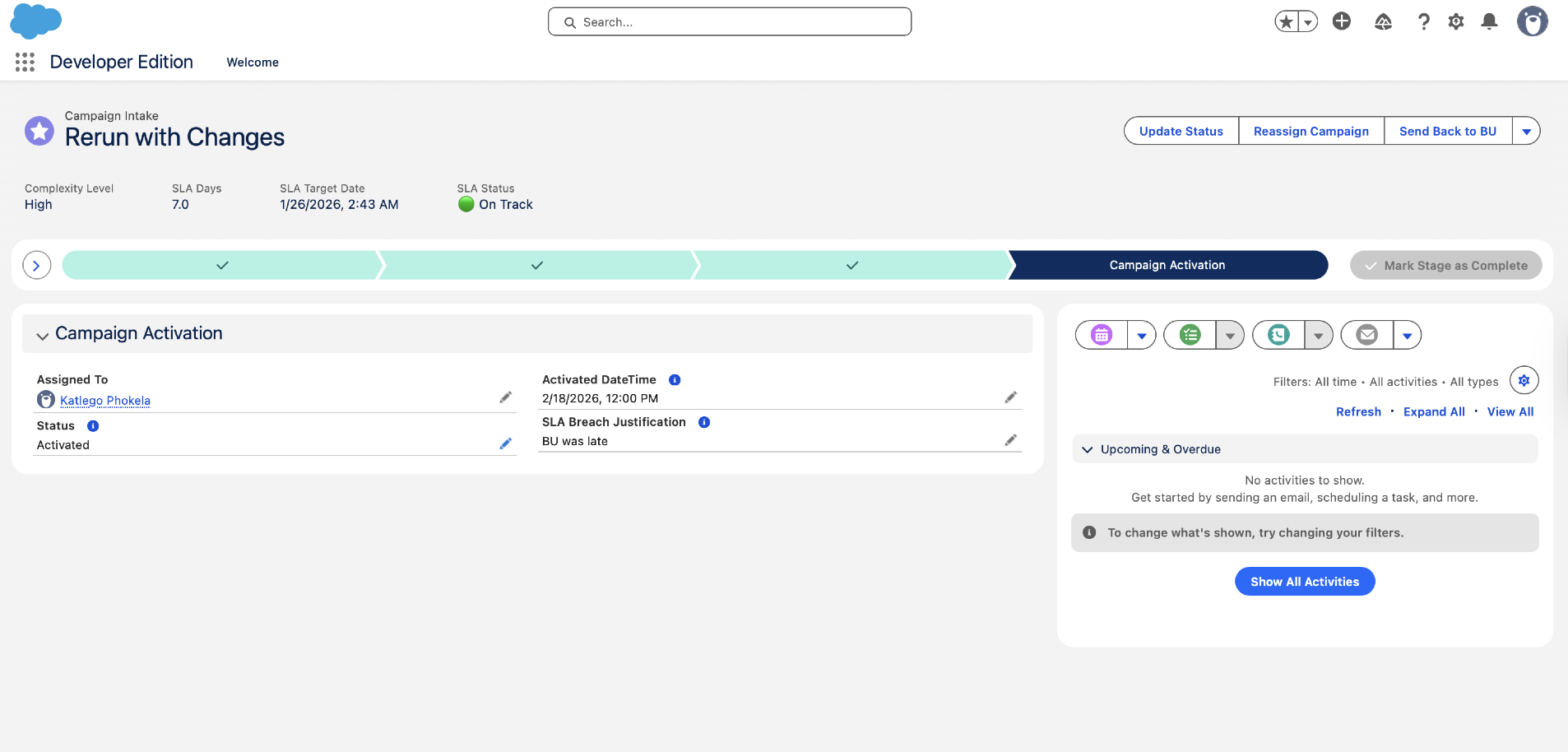
Screenshots from the Salesforce Developer Org showing the PoC in action — the campaign briefing form, list views, Kanban board, lifecycle stages, record-triggered Flows, and custom objects.
Campaign Briefing & Intake
List Views & Kanban
Campaign Lifecycle Stages
Salesforce Flows (Automation)
Custom Objects (Setup)
Ops Lead Dashboard
AI Layer on Top of Solid Foundation
Current state: Phase 1 (Flows-based PoC) is production-ready and delivers full value without any AI. Phase 2 would add Agentforce agents to augment and accelerate key workflows.
Planned Agents (Phase 2)
Agent 1: Intake Validation Agent
Trigger: New Campaign Intake created. Would validate that all BU fields are complete, audience criteria are well-formed, and required assets (content, segments, approvals) are linked. Augments Flow 2 validation with natural language checks. Could eliminate ~30% of Ops lead time reviewing incomplete briefs.
Agent 2: Smart Routing Agent
Trigger: Campaign ready for assignment. Would analyse builder workload, skills match (content vs journey expertise), and availability. Would provide recommendation to Ops lead. Current Flow 3 uses "lowest workload" heuristic; Agent 2 could refine with skill matching and forecast-based load balancing.
Agent 3: Status Notification Agent
Trigger: Campaign status changes. Would generate smart status updates for each audience (Ops lead, builders, BU requestor) with context-specific next steps and timeline. Eliminates "where's my campaign?" queries via proactive, personalised notifications.
Agent 4: Handoff Validation Agent
Trigger: Content Build → Journey Build transition. Would validate prerequisites (content approved, test data ready, segment rules defined, BU sign-off). Prevents incomplete handoffs that cause rework.
Agent 5: QA Automation Agent
Would augment manual QA reviewer by running automated checks on journey configuration (routing logic, segment rules, consent rules, token syntax). Identifies mechanical issues so reviewers focus on judgment calls. Could accelerate QA by 30%.
Agent 6: Campaign Insights Agent
Would analyse historical campaign data to identify patterns (which campaign types take longest, which BUs have highest rework rates, which builders excel at which types). Would feed demand forecasting and capacity planning. Could enable 50%+ improvement in forecast accuracy.
Design principle for Phase 2: All Agentforce agents would read from Salesforce Campaign Intake object and trigger Salesforce Flows to advance state. Agents augment human decision-making (Ops lead still has override authority), not replace it. Phase 1 foundation (Flows + objects) is required; agents enhance it.
Why These Technology Choices
| Decision | What I Chose | Alternative Considered | Why This Way |
|---|---|---|---|
| Automation Engine | Salesforce Flows | Apex code | Flows are admin-maintainable, no developer dependency, iterate faster, visually inspectable. Easier to test and debug. |
| Custom Objects | 3 objects: Campaign Intake, Campaign Builder, Campaign QA Item | Extend standard Campaign object | Custom objects are cleaner, allow full control of fields/relationships, no technical debt from standard object assumptions. |
| Data Strategy Phase 1 | Salesforce only (no Data Cloud) | Integrate Data Cloud from day 1 | Phase 1 PoC delivers value without external dependencies. Data Cloud integrated in Phase 2. Reduces complexity for initial rollout. |
| Reporting | Native Salesforce dashboards | Tableau or Looker | Real-time, no additional licensing, sufficient for ops visibility. Can extend to Tableau later if execs demand more advanced analytics. |
| QA Tracking | Campaign QA Item object (in Salesforce) | External tool (Jira, Monday.com) or Excel | Single platform, agent integration in Phase 2, audit trail, versioning, no additional tool licensing. Standardises QA across all campaigns. |
| Routing Algorithm | Lowest workload (complexity-weighted) | Skill-based or availability-based | Simplest fair allocation in Phase 1. Skill matching and availability checks added as Agentforce Agent 2 in Phase 2. |
| Phase-gating | 3-phase rollout: Phase 1 (Flows) → Phase 2 (Agents) → Phase 3 (Optimisation) | All-at-once deployment | Reduces risk, enables learning, validates Phase 1 before layering on AI. Each phase independent and valuable. |
Guiding principle: Build to value first (Phase 1 with Flows), not to future state. Flows alone standardise the process, improve visibility, and reduce manual overhead by ~85%. Agentforce agents (Phase 2) enhance this, not require it.
What Phase 1 Delivers
Process Efficiency
- Campaign intake-to-assignment: <5 minutes (fully automated, no manual assignment)
- Manual assignment time eliminated: 85% reduction (Ops lead previously spent 8+ hours/week on manual routing)
- Intake validation time: Shifted from human review to automated validation (Flow 2)
- QA standardisation: 10–15 checks per campaign, all captured in Salesforce (vs. Excel + email before)
Visibility & Accountability
- Real-time campaign queue: All campaigns visible in list views & Kanban (vs. spreadsheet before)
- SLA tracking: Every campaign has target dates, pause/resume history, SLA status (On Track / At Risk / Breached)
- Workload distribution visibility: Ops lead can see who's overloaded via dashboard
- Audit trail: All changes (assignments, status transitions, QA results) logged with timestamp and user
Quality & Standardisation
- Incomplete briefs rejected automatically: BU must provide all required fields before assignment (prevents "garbage in")
- Complexity-driven SLAs: Fair deadlines (High campaign gets 7 days, rerun gets 2 days)
- QA standardisation: Same 10–15 checks run on every campaign; no ad-hoc or missed checks
- Validation rules: Prevent invalid state transitions (e.g., can't move to "Ready to Launch" if QA items have failures)
Expected SLA Compliance Lift
Baseline (before build): ~70% SLA compliance rate (many campaigns missed deadlines, no tracking, no escalation)
Expected post-Phase 1: 90%+ SLA compliance
Drivers: Fair SLA calculation (not arbitrary), pause/resume logic (not penalising for BU delays), visible dashboards (Ops lead can escalate At Risk campaigns before they breach), workload balancing (no one overloaded).
Validation Before Production
Testing Strategy
Unit Testing
Each Flow tested in sandbox with valid/invalid inputs. Verify: required fields block save, optional fields don't, formulas calculate correctly, lookups resolve.
Integration Testing
End-to-end campaign journey: submit → validate → assign → build → QA → launch. Verify flows trigger in sequence, data persists, status transitions work.
Complexity Scoring Testing
Test all campaign type + channel combinations. Verify: New 3-channel = High, New 1-channel = Low, Rerun = 2 days, Rerun with Changes + Journey Logic = High.
SLA Pause/Resume Testing
Test SLA clock: submit → pause (BU not ready) → resume (BU ready). Verify: pause time added to SLA Paused Minutes, SLA Target extended, clock restarts.
UAT
Ops lead + 2 builders + 1–2 BU requestors test with real-world campaign scenarios in sandbox. Feedback loop for refinements.
Pilot Rollout
One BU (or region) as pilot user. Monitor for 1 sprint: SLA compliance, team satisfaction, process adherence, bug reports.
Go-live criteria: All unit tests pass, integration tests pass, UAT feedback incorporated, SLA logic validated with real historical data, Ops team trained on dashboards and list views, builders understand Task notifications.